
The Effects Guy - Ultimate Creator Toolkit
by The Effects Guy
The Ultimate Creator Toolkit by The Effects Guy is an all-in-one editing bundle designed to help content creators produce professional-looking videos faster. It includes powerful assets like Flashform transitions, cinematic overlays, clean motion sound effects, animated text presets, and modern gradient backgrounds. Each element is built for a simple drag-and-drop workflow, eliminating complex keyframing and saving hours of editing time. The toolkit also includes a Pro Editor Workflow Course that teaches efficient editing techniques used by professionals. Whether you're editing YouTube videos, reels, or client projects, this toolkit helps your content look polished, dynamic, and visually premium without slowing down your creative process. 🚀
Read more ↓Get this course plus 117+ more with Lifetime Access.
Get Lifetime Access – $997-day money-back guarantee · Refund Policy
WHAT'S INSIDE
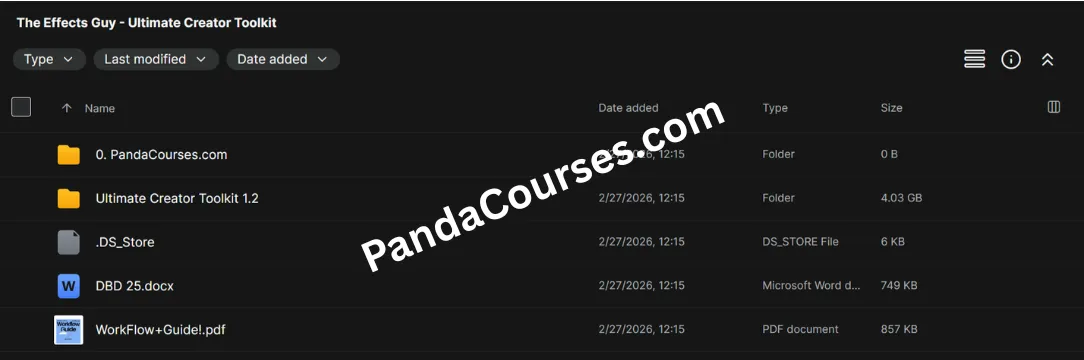
Preview of the course materials.
Course Details
Content creation today moves fast. If you are editing YouTube videos, social media content, or client projects, slow workflows and weak visuals can kill both productivity and quality. Many creators waste hours searching for presets, overlays, and sound effects that actually work together.
The Ultimate Creator Toolkit by The Effects Guy solves this problem by providing a complete editing ecosystem designed to speed up workflows and produce professional-level visuals instantly. Instead of relying on scattered assets, this toolkit combines transitions, overlays, motion titles, sound effects, backgrounds, and a structured editing workflow into one streamlined package.
This article explores everything included in the toolkit, how each component improves editing efficiency, and why it has become a valuable resource for modern content creators.
What Is the Ultimate Creator Toolkit?
The Ultimate Creator Toolkit is a professional asset bundle built specifically for video editors and content creators who want to produce high-quality edits without spending hours on manual animation or complex keyframing.
The toolkit is designed around a drag-and-drop editing workflow, allowing creators to apply cinematic effects instantly inside their editing software.
Instead of assembling different assets from multiple sources, creators gain access to a unified system of transitions, overlays, animated titles, motion sound effects, and backgrounds that are designed to work together seamlessly.
Total Value vs Offer Price
ItemValueFlashform Transition Pack$77Premium Overlay Pack$37Clean Motion Sound FX Pack$67Textflow Animated Titles$77Depth by Design Background Pack$67Pro Editor Workflow Course$67
Total Value: $392
One-Time Price: $157 (Includes upgrades)
Flashform Transition Pack
Cinematic Transitions Without Complex Keyframes
Transitions are one of the most important parts of professional editing, but most preset libraries contain hundreds of unusable effects.
The Flashform Transition Pack solves this problem by focusing only on 16 high-quality film and flash transitions that editors actually use in real projects.
Key Features
Drag-and-Drop Workflow
No manual keyframes or complicated adjustments are required. Simply drag the transition between clips and it works instantly.
Professional Film Style Effects
The transitions are designed to replicate cinematic flash and film-style motion used in modern video production.
Clean and Fast Editing
Instead of scrolling through hundreds of presets, editors can use a curated collection built for speed.
Premium Overlay Pack
Add Texture and Depth to Your Videos
Overlays are commonly used by professional motion designers to give footage more depth and visual character.
The Premium Overlay Pack includes 20 essential overlays used in professional editing workflows.
Included Overlay Types
Film Grain
Adds subtle cinematic texture to digital footage.
Dust and Particles
Creates a natural atmospheric feel in scenes.
Fire Effects
Perfect for dramatic visual storytelling.
Light Leaks
Simulates analog film light exposure for cinematic edits.
These overlays allow creators to make their videos feel more dynamic and alive within seconds.
Clean Motion Sound FX Pack
Professional Sound Design for Faster Editing
Audio plays a critical role in making edits feel impactful. However, finding well-timed sound effects inside large stock libraries can be extremely time-consuming.
The Clean Motion Sound FX Pack includes 100+ professional editing sound effects, carefully collected over six years of professional editing experience.
Sound Effects Included
Impact Hits
Perfect for transitions and visual beats.
Whooshes
Smooth movement sounds that enhance motion graphics.
Risers
Great for building tension before transitions.
UI Clicks
Ideal for interface animations and tech-style edits.
These sounds are optimized for motion graphics and fast-paced editing environments.
Textflow Animated Titles
Professional Typography Without Animation Setup
Typography animation is one of the most time-consuming parts of editing. The Textflow Animated Titles Pack eliminates the need for manual keyframing by providing ready-to-use animated text presets.
What’s Included
12 Handcrafted Title Presets
Each preset is designed with clean motion principles to match modern editing styles.
Fully Customizable
Editors can easily adjust colors using built-in gradient sliders inside Premiere Pro.
Instant Application
Simply drop the preset into the timeline and edit the text.
This makes it easy to create professional titles for YouTube videos, reels, and promotional content.
Depth by Design Background Pack
Minimal Backgrounds That Add Professional Depth
Backgrounds are often overlooked in editing, but they can significantly improve visual clarity and presentation.
The Depth by Design Background Pack includes 40+ smooth gradient backgrounds designed to complement animated titles and overlays.
Key Features
Smooth Gradient Design
Clean gradients create depth without distracting from the main content.
Soft Film Grain
Subtle texture enhances visual quality while keeping the design minimal.
Vertical and Horizontal Formats
Backgrounds are optimized for both landscape and vertical video formats.
This makes them ideal for YouTube videos, Instagram reels, and short-form content.
Pro Editor Workflow Course
Learn the Editing System Behind the Toolkit
In addition to the asset packs, the toolkit includes a Pro Editor Workflow Course that teaches creators how to use the assets efficiently in real projects.
Course Focus Areas
Faster Editing Systems
Learn techniques to reduce editing time significantly.
Professional Visual Structure
Understand how to structure edits so they feel cinematic and polished.
Workflow Optimization
Develop editing habits that improve both speed and quality.
The course complements the assets by showing how to combine them into a powerful editing workflow.
Why This Toolkit Helps Creators Work Faster
The Ultimate Creator Toolkit is designed as a complete editing system, not just a collection of random presets.
By combining transitions, overlays, sound effects, animated titles, and backgrounds into one ecosystem, creators can produce visually compelling edits without wasting time on repetitive tasks.
The toolkit functions as a visual acceleration framework, allowing editors to replace manual animation work with optimized presets and streamlined workflows.
Final Thoughts
For creators who edit regularly, speed and consistency are essential. The Ultimate Creator Toolkit by The Effects Guy provides a structured editing system that helps content creators produce professional-looking videos while saving hours of work.
With a curated collection of transitions, overlays, sound effects, titles, backgrounds, and a workflow training course, the toolkit gives creators everything needed to elevate their editing process.
Instead of spending time searching for assets or building effects manually, editors can focus on storytelling and creative direction while maintaining a high-quality visual standard.
What Our Customers Say
Real feedback from real customers.
Tap a screenshot to enlarge.
Get all 117+ courses with one payment
Lifetime access. New courses included.
7-day money-back guarantee · Refund Policy